VMware’s virtual inventory, landed in the rack: seven vCenters in a single iTRACS
More than 50 variables for every VM and hypervisor, from CPU usage to VLAN, mapped to the exact rack where the physical server lives.
WHAT WE ARE INTEGRATING
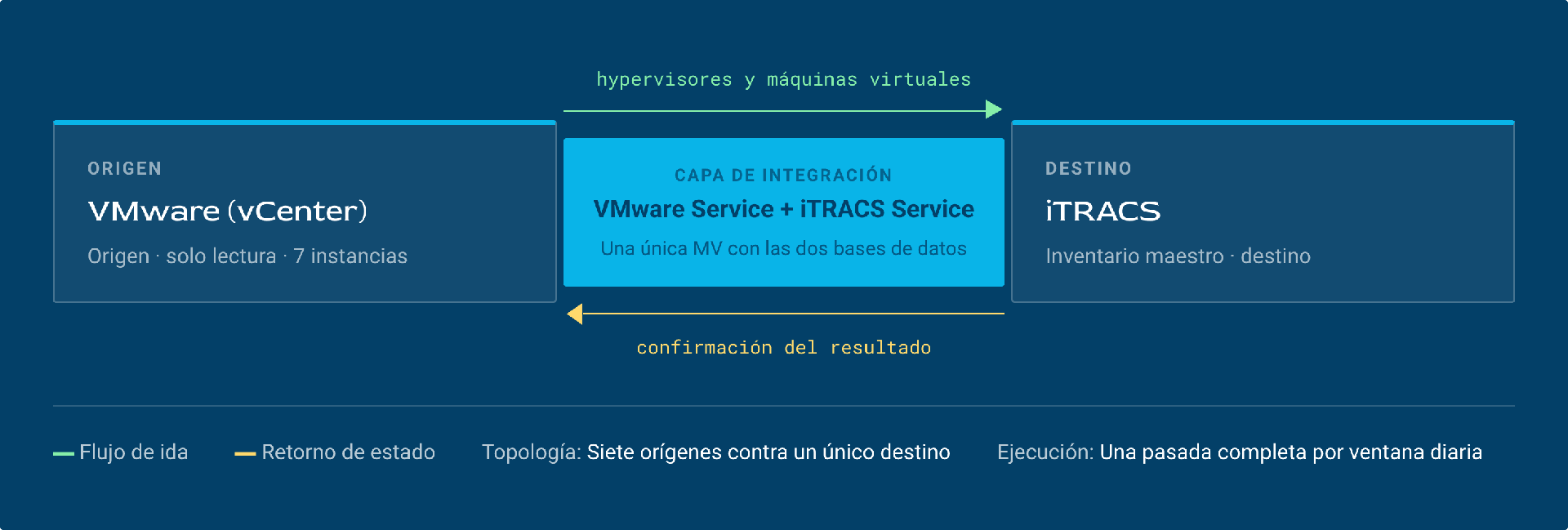
Relationships between hypervisors and virtual machines and the servers they run on. In our success story, we are integrating data from 7 VMware instances, some with thousands of virtual machines, into a single DCiM.
INTEGRATED SYSTEMS
VMWare + ITRACs
MAIN OUTCOME
Know which services run on which machines, to prevent outages or errors caused by having two separate knowledge silos (physical infrastructure and virtualization).
Integration context
iTRACS ON PREM
API used by the integration:
- iTRACS API REST V24.3
Deployment:
- Python 3.10
- Django 5.0 + Django REST Framework
- PostgreSQL 13 running natively on the VM
- Served with Gunicorn + Nginx
VMware ON PREM
API used by the integration:
- vSphere Web Services API 8.0 U3
Deployed in Docker containers, one container per vCenter (currently 13)
- Python 3.10
- FastAPI 0.112.0
- PostgreSQL 13
- Served with Uvicorn (ASGI server)
The challenge: why was this integration needed?
- Complete disconnect between virtual and physical inventory. The virtualization team manages hundreds or thousands of VMs in vCenter, while the infrastructure team manages physical assets in the DCiM. When someone asks “which rack is the server running this critical VM in?”, answering means manually cross-checking two systems that don’t talk to each other. This becomes an operational bottleneck with every incident, every audit and every planned change.
- No way to detect zombie servers or optimize capacity. Without integration, there is no automated way to cross-reference the actual resource consumption of VMs (CPU, memory, disk) with the physical location and available capacity of the rack. Abandoned VMs (“zombies”) keep consuming power, licenses and space without anyone noticing. Usage data lives in vCenter, and physical cost data lives in the DCiM.
- Capacity planning in the dark. When new VMs need to be deployed or hypervisors consolidated, the decision on “where to place the workload” is made without visibility into the impact on physical infrastructure (available rack power, cooling capacity, weight). This creates a risk of overloading racks or rooms without knowing it until a real problem occurs.
- Continuity risk during physical incidents, with no virtual map. When a rack loses power, a PDU fails or UPS maintenance is scheduled, the infrastructure team has no quick way to know which VMs and services will be affected. Without the physical-virtual link, impact assessment is manual, slow and incomplete. This lengthens response times and increases the risk of affecting critical services without warning.
- Scaling deployments without losing control. In large environments (with 13 vCenters across multiple sites and more than 4,000 hypervisors), VM creation grows exponentially. Without an automated flow that registers every VM in the DCiM with its physical location, the inventory becomes outdated within weeks. The business loses the real picture of what it has, where it is and how much it costs to maintain.
- Real capacity vs. theoretical capacity. The DCiM knows the theoretical capacity of each physical server (factory specs and nominal data). But it doesn’t know how much of it is actually being used. The hypervisor does. It knows that a server with 256 GB of RAM is using 47 GB, that its 32 cores are running at 12%, and that it hosts 14 VMs, 6 of which have been idle for weeks. Without that data in the DCIM, capacity decisions are based on catalog figures, not real ones. The result is oversized infrastructure that nobody dares to consolidate, because there is no visibility into actual usage.
- VM distribution: knowing the workload at each physical location. VMware distributes VMs across hosts transparently (vMotion, DRS), but this redistribution is invisible to whoever manages the physical infrastructure. A critical VM can migrate from a host in Room A to another in Room B without the infrastructure team knowing. This has direct consequences. A rack’s thermal and power load changes without the DCiM reflecting it. Maintenance is planned on an outdated picture. And when an incident hits a specific room, no one knows what virtual workload it is actually supporting at that moment. For example: detecting that a rack with 4 hosts concentrates 60% of critical production VMs, a data point neither vCenter nor the DCIM can provide on its own.
- The first challenge was one of scale and identifier uniqueness: seven VMware instances had to be integrated into a single iTRACS instance. When consolidating the inventories of the seven vCenters into one destination, collisions appeared that don’t exist with a single source. Backup replicas carried the same identifiers as their production machines, including the IP address, which iTRACS treats as a unique value. As a result, the same machine could arrive duplicated from several sources. This forced us to rethink the matching logic, so we could distinguish the source of each record and decide which instance was the right one before creating, updating or deleting anything in iTRACS.
- The second challenge was not technological but organizational, with a direct impact on the integration design. Under internal policy, the virtualization team only allowed one call to the VMware API every 24 hours. That rules out any frequent synchronization or retries on failure. Each run must extract everything it needs on the first attempt, tolerate partial errors and leave sufficient records in the logs, because the next attempt doesn’t come until the following day. This shaped both the ETL frequency and the process design, which became oriented toward a single full pass instead of incremental synchronizations.

The systems in the ecosystem
SYSTEM | DESCRIPTION | PROVIDES | RECEIVES |
VMware (vCenter) | Virtualization platform that manages the customer’s virtual infrastructure. | Inventory of hypervisors and virtual machines, via its API. | Nothing: it acts as the source in a one-way, read-only flow. |
iTRACS DCiM | Data center infrastructure management system, where the master inventory resides. | Nothing: it is the data destination. | The already-mapped virtual infrastructure objects, in batches, to be created, updated or deleted on each server they run on. |
The connection diagram
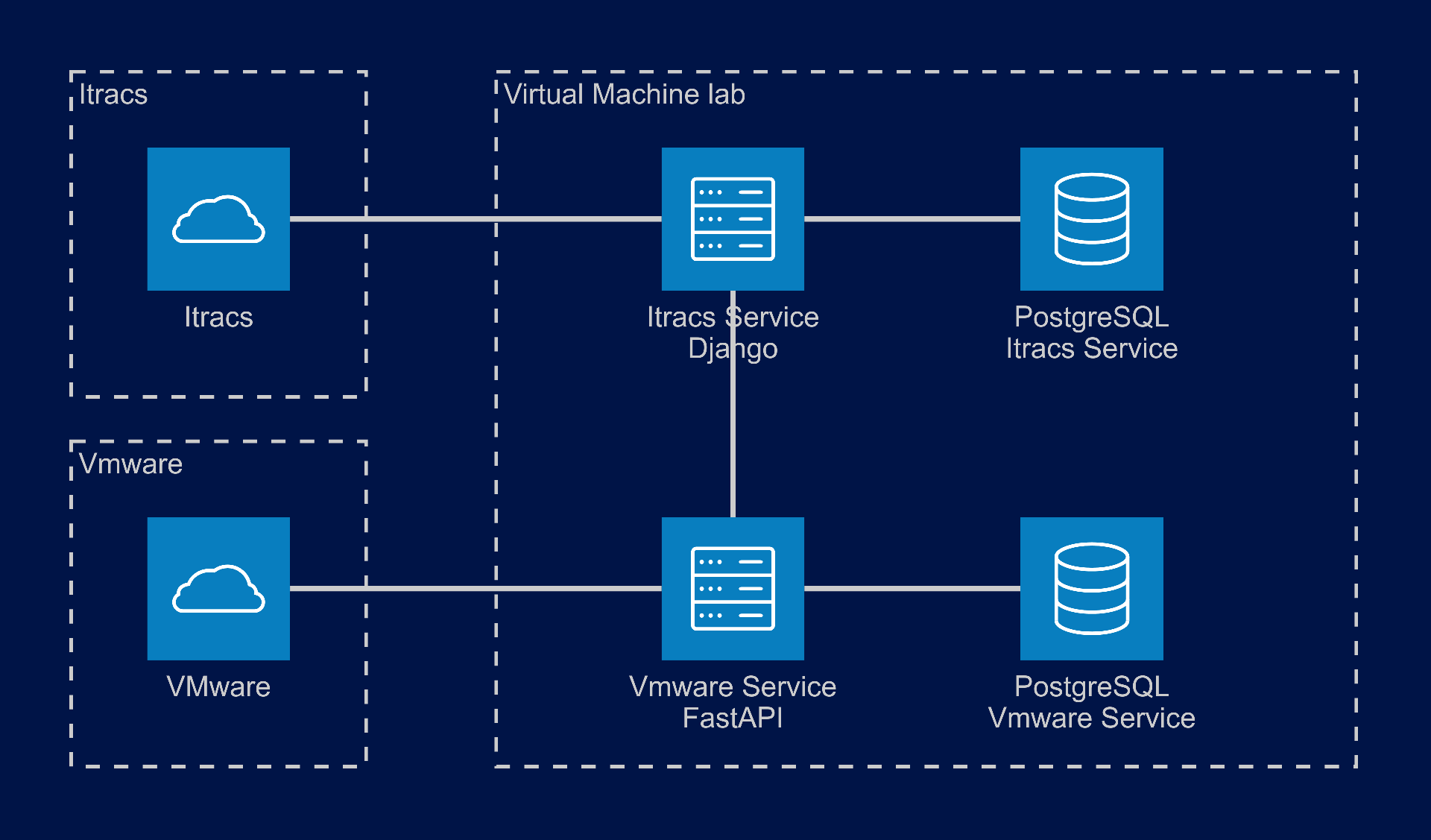
The integration is deployed on a single virtual machine that hosts both services and their respective databases. The two external systems stay outside its perimeter: VMware (vCenter) as the source and iTRACS as the destination. VMware Service is the only component that talks to the VMware API: it extracts hypervisors and virtual machines, normalizes them and persists them in its database. iTRACS Service receives this already-mapped information from it and writes it to iTRACS, also relying on its own database to control duplicates and failures.
Why this architecture
Splitting the integration into two services, each with its own database, is the direct response to the restriction of a single VMware call every 24 hours. Because both the extracted inventory and the errors from each load are stored locally, the process can retry against iTRACS as many times as needed, or fix a mapping and relaunch, without calling the VMware API again. The database thus acts as the source of truth for the daily window. It separates the extraction cycle from the load cycle, allows only failed records to be reprocessed instead of repeating the full extraction, and keeps a record of what failed and why until the next available window..
The data flow in action
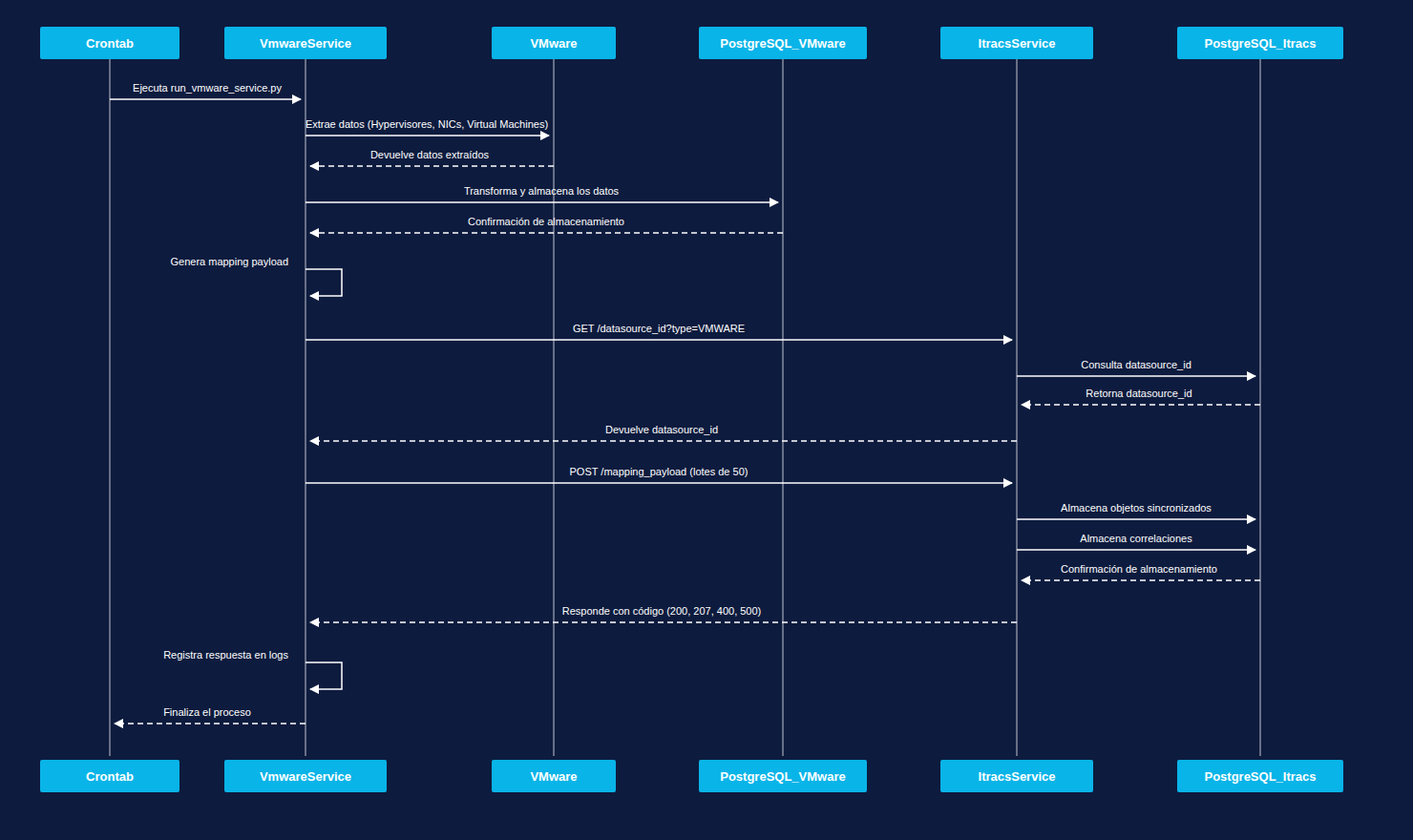
Virtual inventory synchronization flow: from VMware to iTRACS
Start in the authorized window:
The crontab launches the process within the daily window authorized by the virtualization team.
VMwareService requests the inventory of hypervisors and virtual machines from VMware and receives the extracted data.
Normalization and persistence
VMwareService transforms this information and stores it in its database, which remains the local source of truth until the next window.
Reconciliation of additions, changes and removals
The extracted data is reconciled against what is already stored to determine additions, changes and removals, resolving identifier collisions across the seven source instances.
VMwareService generates the mapping payload, translating VMware attributes into the structure iTRACS expects.
Data source identifier
VMwareService requests the data source identifier from iTRACSService, which looks it up in its own database and returns it.
VMwareService sends the payload to iTRACSService in batches.
iTRACSService stores the synchronized objects and their correlations, and confirms the result to VMwareService.
Logging and close
VMwareService logs the response, which allows the load to be retried without calling the VMware API again, and returns control to the crontab.
VOLUME
7 vCenter instances consolidated into a single iTRACS instance, with data sent to the destination in batches of up to 1,000 records.
FREQUENCY
One full run every 24 hours, limited by the virtualization team’s policy.
What made the difference
Design decisions that weren’t the obvious ones, and why we made them.
Key 2: Modularization
We anticipated that the data source would be spread across different vCenters, so we built a service to centralize that data. This also helped us mitigate the problems caused by having only one extraction. We moved the integration’s source of truth to VMwareService, so we can match data without calling the VMware API.
Impact: Data matching without calling the VMware API
Key 1: All parameters are configurable
We built the integration so it can be configured to run as often as every minute. This customer set the limit at once every 24 hours, but our integration can be configured to suit the needs of each data center.
Impact: Configurable to run as often as every minute
Understanding the relationship between logical and physical infrastructure is essential to running a data center properly.
Tell us which systems you have and which ones need to talk to each other.